
A technical SEO checklist
Choose a priority page and follow it as a buyer and a crawler would. Record the response, the path through the site and what you can verify after a repair.
Key takeaway
Give each issue a URL, evidence, a proposed fix, an owner and a retest. Fix an unreachable service page before polishing a title on a page that already works.
Choose a page
Technical SEO is the work of making sure search engines can reach your pages, understand which version of each page is the real one, and see the same content a visitor sees. For a service business, that means your service pages, location pages, practitioner or team pages, and the content that answers buyer questions.
Google's SEO starter guide frames search optimization as helping search engines understand content and helping people decide whether to visit. A checklist turns that into repeatable review steps. It does not replace content quality, and it cannot promise indexing, rankings or any particular result.
Prioritize the issue
A long audit export is not a plan. Sort every finding by two questions: does it affect a page that leads to a consultation request, and does it stop that page from being crawled, indexed or correctly understood? Findings that answer yes to both go first.
A practical ordering uses four tiers. Tier one covers blocking problems on revenue pages. Tier two covers signal confusion such as duplicate URLs and redirect chains. Tier three covers quality improvements such as metadata and headings. Tier four covers housekeeping that carries little risk.
- Tier one: service or consultation pages that are blocked, noindexed, returning errors or missing from internal links.
- Tier two: duplicate or conflicting versions of the same page, redirect chains, and sitemap entries pointing to the wrong URLs.
- Tier three: unclear titles, descriptions, headings and structured data that do not match visible content.
Worked example · sample records
Give the issue an owner and a retest
Which finding blocks useful work, and what proves the repair?
Choose a fictional audit finding. Each record names the consequence, repair and verification rather than assigning an unsupported health score.
Access blocker
- Sample URL
- /airport-transfers
- Evidence
- The intended public service page carries a noindex directive.
- Repair owner
- Website release owner.
- Retest
- Check the response, robots directives, canonical and links after the approved release.
Resolve the unintended block on the priority page first.
Record the changed directive and live URL check; eligibility does not guarantee indexing.
Examples explain a review method. They do not report customer work, live measurements or a submitted inquiry.
Crawl and index checks
Start with the pages that matter most: each service page, each location or office page, and the main consultation request page. For each one, confirm it returns a successful status, is not blocked by robots rules, does not carry a noindex directive, and appears as indexed in Search Console's page inspection.
Compare the list of pages you want found against the list Google reports as indexed. Gaps fall into two groups. For a missing page, check access, canonical selection and the most recent crawl. Record any verified issue. Even an eligible page may remain unindexed. Pages that are indexed but should not be, such as internal search results, thank-you pages or staging copies, need to be removed from the index through the appropriate method.
Do this review on the live site, not only on a staging build. Staging settings that block crawlers are a common cause of problems when they are carried into production by mistake.
URLs and response codes
Each page should have one preferred URL. Variations from protocol, www versus non-www, trailing slashes, tracking parameters and filters can create duplicates. Use a consistent canonical signal, and make sure redirects, internal links and sitemaps all point to the same preferred version.
Follow representative URLs through the release. An existing page that has moved should point to its relevant replacement. A missing URL should return an appropriate error status. A branded “page unavailable” screen returned with HTTP 200 can conceal the problem in a status-only test.
Redirect chains slow visits and dilute clarity. After any migration or URL cleanup, map old URLs directly to final destinations and retest them.
Links and sitemaps
Crawlers discover pages by following links. Important pages should be reachable through standard HTML anchor links with descriptive text, not only through scripts, menus that load on interaction, or forms. A page that appears only in a sitemap and has no internal links is a warning sign about its importance and findability.
An XML sitemap lists the URLs you want considered. Include only canonical, indexable, successful URLs. Remove redirected, blocked, noindex and error URLs, and keep the file updated when pages are added or retired. A sitemap supports discovery; it does not guarantee that a URL will be indexed.
Metadata and markup
Each page needs one clear main heading that matches its purpose, followed by subheadings that divide the content in a logical order. Headings are for structure and comprehension, so write them as the questions or topics a buyer actually has rather than as keyword strings.
Titles and descriptions should be unique and accurately describe the page. Titles help search engines and people identify a result. Descriptions may be used as snippets, though search engines can choose different text. Avoid duplicating the same title across many location or service pages.
Structured data should describe what is visibly on the page. Google's structured data policies call for markup that reflects the visible content and is not misleading. If a page does not show an address, hours, a review or an author, do not mark them up. Validate markup, and check it again after template changes.
Check the release
Most technical regressions arrive during releases: a template change, a plugin update, a redesign or a migration. Before launch, run a pre-release check covering robots rules, noindex settings, canonicals, redirects, sitemap output, and structured data on a sample of important templates.
After launch, monitor on a schedule. Review Search Console coverage and indexing reports, crawl errors, sitemap status and form or call tracking. Record what changed and when, so a reviewer can investigate a change in traffic or inquiries alongside other possible causes.
Illustrative example
Regional private ground transportation company
A hypothetical company redesigns its site. Its airport transfer, corporate travel and event transportation pages move to new URLs, and the quote request page is added to a new template.
- List the pages that lead to a custom quote request and rank them by their role in the business.
- Crawl the staging site and confirm that no robots or noindex rules are set that would carry into production.
- Map every old service URL to its final new URL with a single permanent redirect.
- Update internal links, canonicals and the XML sitemap to the new preferred URLs.
- Check that headings, titles and any structured data describe what each new page visibly shows.
- After launch, inspect key URLs in Search Console and review indexing and sitemap reports on a set schedule.
A one-page prioritized issue register that lists each finding, the affected page, its business role, the fix, the owner and the verification step. This illustrates a proposed HAI deliverable and is not a record of completed work.
Technical SEO release checklist
 Explore the four-step SEO walkthroughFollow a search question to the page that answers it.

From search to a service page


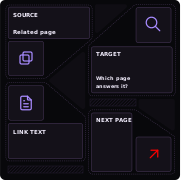
Read the four steps
Identify essential pages
Start with the pages tied to a real service, location or inquiry. Check discovery, indexing signals and the route from the main navigation.
Set priorities
Separate access problems from missing information, then rank fixes by their likely effect on a buyer.
Improve the route
Correct technical issues within scope, clarify service and location details, and add useful links from related pages.
Verify the change
Recheck the specific issue and compare later search and inquiry data with the baseline where available.
Questions and answers
What should be fixed first in a technical SEO audit?
Fix problems that stop a consultation-driving page from being crawled, indexed or correctly understood. Examples include accidental noindex tags, robots blocks, error responses and pages with no internal links. Lower-impact warnings can wait.
How often should an XML sitemap be updated?
Whenever pages are added, removed or moved. Most content systems can generate the file automatically. Review it after each release to confirm it lists only canonical, indexable URLs that return a successful status.
Can structured data improve my rankings?
It is not a ranking guarantee. It helps search engines understand a page and may make it eligible for certain appearances. It must reflect visible content and follow Google's structured data policies.
What breaks most often during a website redesign?
Redirects, canonicals, robots or noindex settings, internal links and sitemaps. Plan and test these before launch, then check indexing and crawl reports afterward.
Sources
- Google Search Central — SEO Starter Guide
Guidance on discovery, descriptive pages and links people can follow.
- Google Search Central — Canonical URLs
Signals a site can provide when several URLs have the same or similar content.
- Google Search Central — Structured data guidelines
How visible page content, markup accuracy and eligibility relate.